Method and official guidance checked October 25, 2026
Calculator for payroll hours
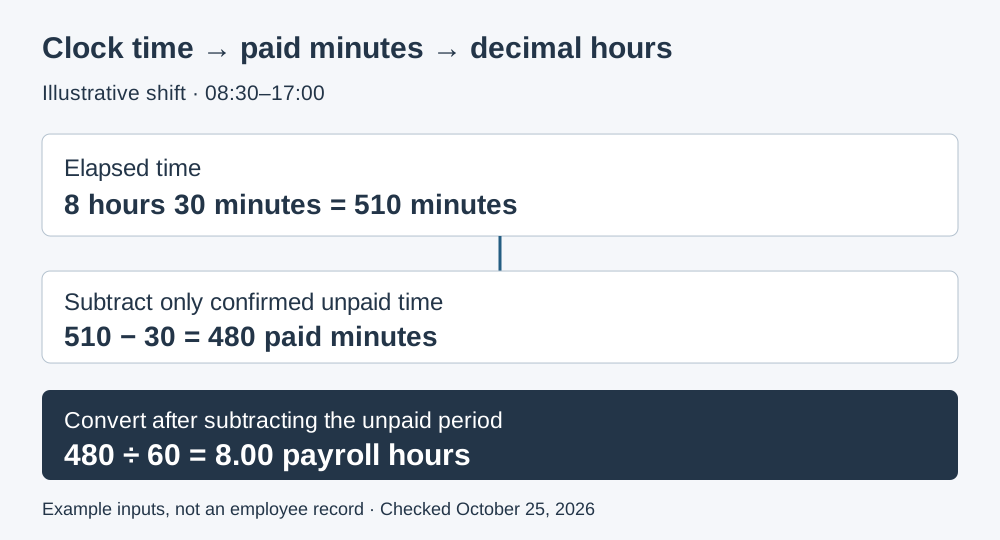
An illustrated 08:30–17:00 shift with a confirmed unpaid 30-minute meal period produces 8.00 payroll hours. Elapsed time is 510 minutes; 510 − 30 = 480 paid minutes; 480 ÷ 60 = 8.00 decimal hours. Five identical shifts total 2,400 minutes ÷ 60 = 40.00 hours. These are editable example inputs, not your employee records.
Calculate entered paid time for one employee
The first five rows contain the illustrated schedule. Replace them with actual time records; leave an unused day completely blank. On a worked day, blank unpaid minutes stay pending; zero means you have confirmed no deduction. Select the next-day box explicitly for an overnight shift. An earlier end time is never silently treated as tomorrow.
This tool adds clock minutes. It does not classify breaks, calculate wages, set overtime rates or round punches. Shifts crossing a daylight-saving clock change require an independently confirmed elapsed duration; clock labels alone cannot establish it.
Minutes are not hundredths of an hour
Decimal hours = whole hours + remaining minutes ÷ 60. Seven hours thirty minutes is 7 + 30 ÷ 60 = 7.50 hours, not 7.30. Entering 7.30 into a decimal-hour field loses 0.20 hour, or 0.20 × 60 = 12 minutes. Across five identical shifts, that error totals 12 × 5 = 60 minutes. These are arithmetic examples, not assumed wage records.
| Example shift | Elapsed minutes | Confirmed unpaid minutes | Paid minutes | Decimal hours |
|---|---|---|---|---|
| 08:30–17:00 | 510 | 30 | 510 − 30 = 480 | 480 ÷ 60 = 8.00 |
| 09:00–17:00 | 480 | 30 | 480 − 30 = 450 | 450 ÷ 60 = 7.50 |
| 22:00–06:00 next day | (24:00 − 22:00) + 06:00 = 480 | 30 | 480 − 30 = 450 | 450 ÷ 60 = 7.50 |
The overnight example assumes no clock change. Keep the exact paid-minute total across shifts and divide once. For example, three shifts of 8 hours 1 minute each total 481 × 3 = 1,443 minutes, or 24.05 hours; summing three independently rounded 8.02-hour displays instead would give 24.06. The calculator sums minutes internally and displays two decimal places only after conversion. Its CSV retains both values.
Do not subtract a break just because there is a box
Federal guidance generally counts short rest breaks as hours worked. A meal period is not automatically unpaid just because it is called lunch; relief from work duties matters. The tool requires your confirmed unpaid amount rather than deciding which periods qualify. Applicable state rules and other obligations need separate review.
Department of Labor official hours-worked guidance · checked October 25, 2026 explains work time and breaks. The official indexed text was checked when direct retrieval was restricted. The Department of Labor official rest-and-meal-period advisor · checked October 25, 2026 also distinguishes rest breaks from bona fide meal periods.
Keep the result attached to the underlying record
Use a separate worksheet for each employee and actual workweek, and retain dates in your timekeeping system. The Department of Labor official recordkeeping guidance · checked October 25, 2026 calls for daily hours and workweek totals among records for covered nonexempt employees. This export is a calculation aid, not a complete compliance record.
- Confirm the actual start and end times, including additional worked segments.
- Confirm which break minutes may be excluded; do not guess an unanswered amount.
- Verify overnight dates and any daylight-saving clock change.
- Match the entries to the employee's actual workweek rather than pooling employees.
- Review overtime, paid leave, on-call time and other applicable pay rules separately.
The CSV includes blank response cells for these checks and its generation date. Hours worked are separate from provider charges: use the annual payroll cost calculator for the software quote. Once wages are established, the employer payroll-tax estimation worksheet handles a different question; this page does not estimate employer taxes.
Three questions before exporting
Is 7:30 the same as 7.30 payroll hours?
No. Seven hours thirty minutes is 7.50 decimal hours. Clock notation counts sixty minutes per hour; a decimal payroll field uses fractions of an hour.
Can the calculator handle an overnight shift?
Yes, when you explicitly select End is next day and no clock change affects elapsed time. Otherwise an end earlier than the start is flagged rather than guessed.
Does the total tell me overtime pay?
No. It totals entered paid time only. Coverage, the employee's workweek, regular-rate calculations and applicable overtime rules require separate review.
Examples and conversion formulas are original arithmetic from stated inputs. No estimated wage, tax rate or software fee is inserted.